
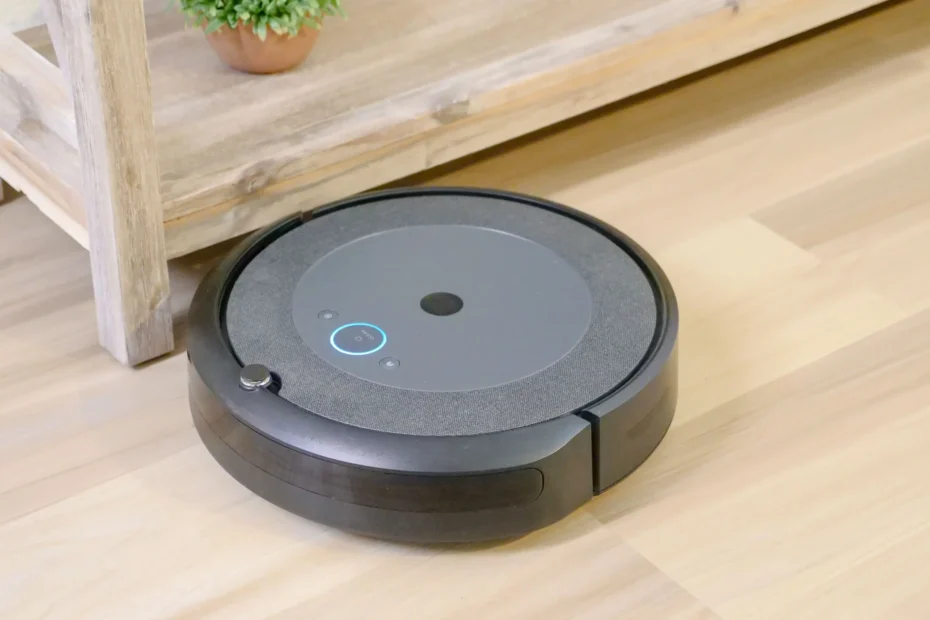
Robot vacuums have gone from a quirky gadget to one of the most common smart home purchases. They promise a simple deal: spend some money once, and let a small machine handle the daily floor chores while you do something else. But do they really deliver, and are they right for your home?
This guide gives you an honest answer. We cover who benefits most, what a robot vacuum really costs over time, which features matter, the privacy questions most buyers forget to ask, and how a robot vacuum fits into a smart home. By the end, you will know whether to buy one, and what to look for if you do.
The Short Answer: Are Robot Vacuums Worth It?
For most households, yes, with one important condition: you need realistic expectations. A robot vacuum is excellent at daily maintenance cleaning. It keeps dust, crumbs, pet hair and tracked-in dirt under control so your floors never get really dirty. It is not a full replacement for a regular vacuum. Even expert reviewers, such as the team at TechRadar in their robot vacuum buying guide, suggest pairing a robot with a manual or cordless vacuum for stairs and occasional deep cleans.
Think of it this way: a robot vacuum does not make cleaning disappear, it makes the big cleaning rarer and easier.
Who Gets the Most Value From a Robot Vacuum
A robot vacuum is usually a great purchase if you:
- Have pets. Hair and dander build up daily, and a robot that runs every morning keeps it manageable.
- Have a busy schedule. Running the robot while you are at work gives you back time you would otherwise spend pushing a vacuum around.
- Live in a home with mostly flat floors. Hardwood, tile, laminate and low-pile carpet are where robots shine.
- Have limited mobility or back pain. Not having to bend, push and carry a vacuum is a real quality-of-life improvement.
- Like the idea of automation. If you enjoy building a connected home, a robot vacuum is one of the most useful devices to add.
Who Should Think Twice
A robot vacuum may disappoint you if you:
- Live in a multi-level home and expect one robot to clean every floor without help. Robots do not climb stairs, so you either carry them or buy one per level.
- Have thick, deep-pile rugs or a lot of floor clutter such as cables, toys and clothes. Cleaning gets interrupted, and you may spend more time preparing the floor than you save.
- Want a deep, once-a-month clean. Robots maintain, they do not restore.
- Are on a very tight budget. A cheap robot with poor navigation can be more frustrating than useful.
What a Robot Vacuum Really Costs
The price on the box is only part of the story. Here is what to budget for.
Purchase price. Robot vacuums span a very wide range. As a rough guide, basic models start around the low hundreds of dollars, solid mid-range models with good mapping and obstacle avoidance sit in the middle, and premium models with self-emptying and self-washing docks cost considerably more. Prices change often with sales, so always compare current offers.
Replacement parts. Filters, side brushes, main brushes and mop pads wear out. Plan to replace them every few months to a year depending on use, and check the price of replacements before you buy. Some brands make parts cheap and easy to find, others do not.
Dust bags. If you choose a self-emptying dock, you will need to replace the dust bags periodically.
Your time. A robot still needs a few minutes of weekly attention: emptying the bin, untangling hair from the brush, and wiping sensors. A good model keeps this short.
A simple way to judge value: if a robot saves you even 20 to 30 minutes of vacuuming a week, that is roughly 17 to 26 hours a year. For many families, that alone justifies a mid-range purchase.
The Features That Actually Matter
Spec sheets are full of marketing numbers. These are the features that make a real difference.
1. Navigation and Mapping
This is the most important feature. Modern robots use LiDAR (a spinning laser), cameras, or a mix of sensors to map your home. Good mapping means the robot cleans in neat rows, remembers your floor plan, lets you set room-by-room schedules and no-go zones, and rarely gets lost. Very cheap robots without mapping bump around randomly, which wastes battery and often misses spots.
2. Obstacle Avoidance
Cables, socks, pet bowls and (for pet owners) accidents are the classic robot vacuum nightmares. Better models use sensors or cameras to spot and steer around obstacles. If you have pets or small children, this feature is worth paying extra for.
3. Suction and Brush Design
Higher suction figures sound impressive, but brush design matters just as much. For homes with long hair or pets, look for tangle-resistant brushes. Check reviews specifically about hair, because that is where robots most often fail.
4. Mopping (Be Realistic)
Many robots now vacuum and mop in one pass. Light mopping is genuinely useful for keeping hard floors fresh between proper cleans. It will not scrub dried-on stains. If you have carpets, make sure the robot can lift or avoid its mop pad when it crosses them.
5. Self-Emptying and Self-Washing Docks
A dock that empties the bin automatically means you may only deal with dust every few weeks. Self-washing mop docks take it further. These are convenient but add cost and take up floor space, so measure the spot where the dock will live.
6. Battery Life and Recharge-and-Resume
For larger homes, choose a model that returns to its dock to recharge and then continues where it stopped, so a big floor plan still gets finished.
7. The App
You will use the app constantly for schedules, maps and alerts, so a clumsy app can ruin a good robot. Read recent reviews that talk specifically about app reliability and update frequency.
The Privacy Question Most Buyers Skip
A robot vacuum is a roaming sensor that maps the inside of your home. Some models also include cameras and microphones. That makes privacy and security a real part of the buying decision, not a footnote.
Consumer Reports tested a range of robot vacuums and found that none of the Wi-Fi connected models were terrible at privacy and security, but none were great either. Their privacy experts also stressed that any camera in a robot vacuum should have solid security protection so attackers cannot reach it. The same report noted that robots with no Wi-Fi create no data concerns at all, though you give up mapping and app features.
Here are practical steps to protect yourself:
- Think twice about cameras. If you do not need camera-based obstacle detection, a model that relies on LiDAR and other sensors is a more private choice.
- Use a strong, unique password for the robot’s account, and turn on two-factor authentication if it is offered.
- Keep firmware updated. Updates fix security holes. Mozilla’s Privacy Not Included guide repeatedly recommends updating firmware and limiting how much data your device shares.
- Review the app permissions and privacy settings. Turn off data sharing and cloud map storage if you do not need them.
- Put the robot on a guest or IoT network if your router supports it, so it is separated from your computers and phones.
- Check the brand’s security track record before buying, including whether it publishes updates regularly and accepts vulnerability reports.
If you care about home security as a whole, our guide to easy home security tips to keep your family safe covers the basics, and our article on whether smart locks are safe and worth it is a good companion read.
How a Robot Vacuum Fits Into a Smart Home
A robot vacuum becomes much more useful when it works with the rest of your connected home.
Voice assistants and routines. Most robots work with Alexa and Google Assistant. You can say “start vacuuming” or build a routine, for example, the robot starts when the last person leaves the house and pauses when someone arrives.
Matter support. Matter is the cross-brand smart home standard backed by major tech companies and managed by the Connectivity Standards Alliance. Version 1.2 added robot vacuums as a supported device type, as TechRadar explained when the update launched. In practice, this means a Matter-compatible robot can show up in apps like Apple Home or Google Home with basic controls such as starting a clean and choosing a cleaning mode. Advanced features such as room maps and zone cleaning usually still live in the manufacturer’s own app. If you want a future-proof smart home, Matter support is a bonus worth checking for, but do not treat it as essential.
Smart home automation ideas. Once your robot is connected, try these simple automations:
- Start a clean when everyone has left home.
- Run the robot at a time that will not clash with video calls or sleep.
- Get a notification if the brush is tangled or the bin is full.
- Send the robot to clean under the dining table after meals.
A Simple Buying Checklist
Before you click “buy,” answer these questions:
- How big is my home, and how many floor types do I have? Hard floors and low carpet suit nearly any robot. Thick rugs need a stronger model.
- Do I have pets or long hair in the house? If yes, prioritize obstacle avoidance and tangle-resistant brushes.
- Do I want mopping or only vacuuming? Buy only the mopping features you will really use.
- Do I want a self-emptying dock? Great for convenience, but check the space and the cost of dust bags.
- Am I comfortable with a camera? If not, choose a non-camera model.
- Are replacement parts easy to find and affordable?
- What is the warranty and return policy? Robot vacuums are personal: buy from a store with an easy return option, so you can test it on your own floors.
Getting the Best Results After You Buy
A few small habits make a big difference:
- Do a quick floor sweep first. Pick up cables, socks and small objects before the first runs.
- Run it often. Frequent short cleans work better than occasional long ones, because less dirt builds up.
- Empty the bin and clean the filter regularly. A full bin or clogged filter reduces performance quickly.
- Cut away tangled hair from the brush roll every week or two.
- Wipe the sensors and charging contacts with a dry cloth to keep navigation accurate.
- Keep a regular vacuum for stairs, corners and deep cleans.
Robot vacuums also work best as part of a routine, not a replacement for one. If you want a simple plan for the rest of your home, see our Simple Home Maintenance Checklist for easy tasks to do all year round.

Frequently Asked Questions
Do robot vacuums work on carpet?
Yes, most handle low and medium carpet well. Thick, deep-pile rugs are harder, and long fringe can tangle in brushes. If you have a lot of carpet, look for a model that specifically advertises strong carpet performance and automatic carpet detection.
Will a robot vacuum replace my regular vacuum?
For most homes, no. It handles daily upkeep, while a regular or cordless vacuum still does stairs, edges, upholstery and deeper cleans.
Are robot vacuums safe with pets?
Generally yes, and many pets get used to them quickly. Choose a model with good obstacle avoidance if there is any chance of pet accidents on the floor, and always supervise the first few runs.
How long do robot vacuums last?
With regular maintenance and replacement of wear parts, many last several years. The battery is often the first major component to wear down, so check whether it is replaceable.
Can a robot vacuum be hacked?
Any internet-connected device can have security weaknesses, particularly models with cameras. You reduce the risk with strong passwords, two-factor authentication, firmware updates and a reputable brand with a good security record.
Is a robot vacuum worth it for a small apartment?
Often yes. Smaller spaces are quick to map and clean, and even a modest model can keep floors tidy with very little effort. You likely do not need a premium self-emptying dock in a small space.
Final Verdict
A robot vacuum is worth it if you want to cut down on routine cleaning, you mostly have flat floors, and you are willing to maintain it for a few minutes each week. It is less worthwhile if you live in a cluttered home with deep rugs, expect it to replace every other cleaning tool, or are unwilling to think about privacy settings.
Start by deciding which problems you actually want to solve, such as pet hair, daily crumbs or saving time. Then choose the simplest model that solves them well. A reliable mid-range robot with good mapping and obstacle avoidance beats a flashy flagship you never fully use.
Once you have one running, you will probably wonder how you managed without it.
Disclosure: SmartHomeTips provides general information to help readers make informed decisions. Product features and prices change often, so always check the manufacturer’s latest details before buying.